Pages

Subscribe:

Ads 468x60px


Social Icons

Would you attend an Outdoor Movie Night in the spring?

Thursday, November 8, 2012

Veteran's Day Word Clouds

The fourth graders in Mrs. Sale and Mrs. Jensen's class created word clouds for Veteran's Day. As a group we brainstormed adjectives that would describe a Veteran. Students entered those adjectives into Tagxedo.com to create a word cloud. Tagxedo.com offers students the opportunity to change color schemes, fonts, and shapes of their word cloud. This is a good alternative to Wordle.net. In Tagxedo, students saved their word cloud as a JPEG file and uploaded those files to their teacher's Blackboard site. Check out some of the winning designs!

FIRST PLACE!

Caleb Henn
 
SECOND PLACE!
 
Justin Culbertson
 
HONORABLE MENTIONS
Brailyn McClure

 Jesse Lucas

Kayeleb Bolton
 

 Savannah Goodman

 Tiffany Dailey

 Check out www.tagxedo.com


Tuesday, November 6, 2012

Casting Our Ballots

For Election Day 2013 students in grades K-5 were given the opportunity to vote in a mock election. Students lined up at the polls ready to cast their ballots. The polling station was set up in our gymnasium just down the hall from the REAL polling booth for our community members. It was great for students to see adults or as students called them "real voters"  before going to make their own voting decisions. :-)

Students were voting for two seperate issues. First students were taking their turn to vote for their candidate for President of the United States. Many students were very educated on their reasons for chosing the candidate that they selected. Our PTO also raised enough money to buy a new set of playground equipment for the upper grade wing of our building. Students in all the grades were able to give their opinion which playground setup they would like purchased for Bon Air. Check out some of our smallest voters to date, Mrs. Houston's kindergarteners!


Friday, November 2, 2012

LINO IT

Lino-it is an online webtool that allows users to post interactive sticky notes and photographs to a collaborative canvas. Students in our classrooms have been using Lino boards to ask their teacher questions, share their opinions, or make predictions about lessons for the day. Lino It allows students to post from their individual device to a group canvas for all other students to be able to view and respond. This is a great site to build collaboration and inquiry in your classroom. Below you will see some of our Lino boards and will also see some third grade students posting information during an assignment. Check out http://en.linoit.com/ to start posting!

 
To get familiar with using Lino, students asked Mrs. Hollingsworth questions. The students questions were in yellow and the answers were in green.

 
Later, Mrs. York used a Lino to post pictures of various graphs. Students looked at the graphs and answered her questions, which were on blue post it notes.
 
 
In fourth grade, Mrs. Sale's class created story problems using yellow post it notes. Then Mrs. Jensen's class accessed the same Lino board from their room and figured out the answers to the problems. They posted their answers in blue.


Third grade students using Lino in their classroom.


Thursday, November 1, 2012

New Student Orientation Classes

When new students enroll into the Technology Academy at Bon Air they attend a new student orientation class to get acquainted with their new computing device. Students meet with Mrs. Hollingsworth, the technology coach, and together they learn log in procedures, how to access various printers, opening certain applications and programs, and they discuss basic care and handling procedures along with cyberbullying concerns. After attending this orientation the new students earn their Digital Driver's License. Check out these kids during their orientation class!

Thursday, October 25, 2012

KUNO Deployment

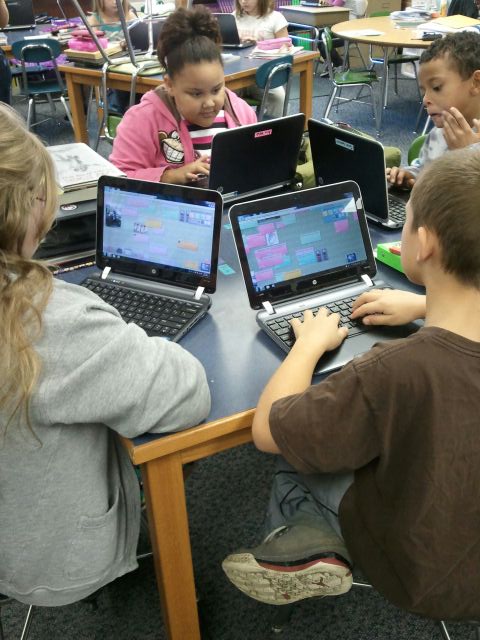
Students in grades K-2 have been doing a marvelous job using their brand new KUNO devices. The KUNO uses Android software to support learning applications and websites for the students to use daily during classtime. In these photos, students in second grade used the website Spelling City to practice their spelling words for their upcoming test. Students were able to play games for review or take a practice quiz online. Spelling City allows teachers to upload class lists so that students can automatically find their teacher's account and practice words for the week with a click of a button. Students also have the ability to upload their own custom content if they have individualized lists to use during spelling. Check out www.spellingcity.com!


Tuesday, October 16, 2012

Parent Academy

Bon Air Elementary recently kicked off its first evening of Parent Academy sessions. The theme of the night was "Be Prepared, Be Safe" and we were shocked by a guest appearance from BATMAN himself! Students and their families came to watch technology demonstrations using Smartboards, Clickers, Spelling City, and Class Dojo. The Bon Air family honored a hometown hero, Joe Dunbar, during a ceremony and presented him with an award. Mr. Dunbar and Ann Milikan toured our school while teachers were doing their technology demonstrations

Families also visited the gymnasium to learn about being "safe" inside and outside of school. Organizations like the fire department, police department, neighborhood watch agencies, etc. came and hosted booths for the kids to learn about safety. We also distributed information from On Guard Online to inform parents and children about cyberbullying and safe Internet practices.  The night concluded with a free Mexican Fiesta dinner and a blacklight performance from our fifth graders students showing kids how to make good choices. Check out the pics below.

For more information from On Guard Online's programs click http://www.onguardonline.gov/. This website includes more information on security, Internet fraud, and safe practices. If you are located in our school district please email jhollingsworth@kokomoschools.com if you would like a brochures for your class. Outside of our district? You can also order free copies of brochures, just like we did, to pass out to students at bulkorder.ftc.gov.

 Several students practice using the Smartboard's in a first grade classroom.
 
 A second grade classroom shows families how they can practice their spelling words online using Spelling City. (www.spellingcity.com)
 
 Even some grandparents practiced using our clickers to text their answers to the teacher.
 
 Two fourth graders practiced their vocabulary skills using a Smartboard .
 
 A third grade teacher shows a group how she used Class Dojo to track behaviors. (www.classdojo.com)

 A fifth grade poses for a photo opp!
 
  Enter the BATCAVE!
 
Families visiting the information booths around the gymnasium.
 

 Our fifth grade performance group. (with Batman!)

Mrs. Concus, our principal, honors our hometown hero, Joe Dunbar.

Friday, October 12, 2012

Clifford's 50th Birthday Live Webcast

On September 24th students in grades K-2 gathered in the auditorium to view a live webcast from New York City celebrating Clifford's 50th Birthday. Norman Bridwell, a Kokomo native, was interviewed live answering questions about his Clifford the Big Red Dog series. Clifford books are used by teachers world-wide in many various languages to teach kids to be kind, share, tell the truth, be a good friend, to help others, play fair, be polite, respect others, believe in yourself, and to work together.

We are proud that the author of such a famous series is from our hometown! Norman Bridwell was born in Kokomo in 1928, he attended school in Kokomo and graduated from Kokomo High School in 1945. He was a cartoonist before he created his Clifford books. The character Emily Elizabeth is named after his daughter. The award-winning Clifford series now includes more than 40 books, has a television series, and was made into a live musical!

Check out our kids viewing the webcast.
Waiting for the webcast to begin.
 
K-2 students getting ready for Clifford's Birthday Celebration Webcast!
 
 Clifford, Norman Bridwell (author) and the host of the webcast singing Clifford Happy Birthday.


 The President of Scholastic (right) visits to declare the day National Clifford Day.


Go to this website to view some interactive Clifford storybooks.
http://teacher.scholastic.com/clifford1/

Want to view the webcast yourself, click the link below! (It may take some time to load.)
http://www.scholastic.com/cliffordwebcast/