For Election Day 2013 students in grades K-5 were given the opportunity to vote in a mock election. Students lined up at the polls ready to cast their ballots. The polling station was set up in our gymnasium just down the hall from the REAL polling booth for our community members. It was great for students to see adults or as students called them "real voters" before going to make their own voting decisions. :-)
Students were voting for two seperate issues. First students were taking their turn to vote for their candidate for President of the United States. Many students were very educated on their reasons for chosing the candidate that they selected. Our PTO also raised enough money to buy a new set of playground equipment for the upper grade wing of our building. Students in all the grades were able to give their opinion which playground setup they would like purchased for Bon Air. Check out some of our smallest voters to date, Mrs. Houston's kindergarteners!
Would you attend an Outdoor Movie Night in the spring?
Tuesday, November 6, 2012
Friday, November 2, 2012
LINO IT
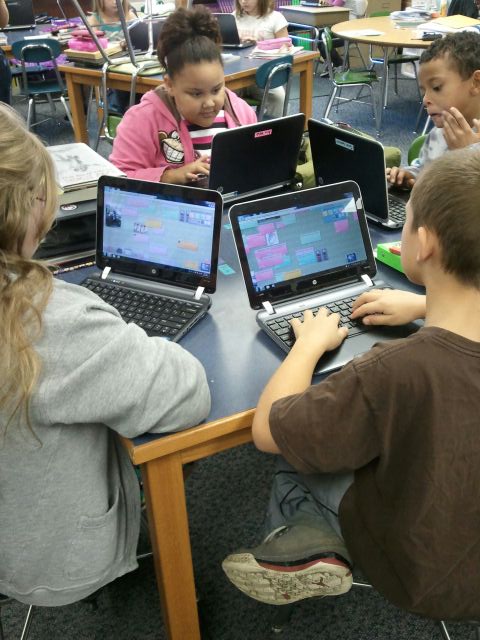
Lino-it is an online webtool that allows users to post interactive sticky notes and photographs to a collaborative canvas. Students in our classrooms have been using Lino boards to ask their teacher questions, share their opinions, or make predictions about lessons for the day. Lino It allows students to post from their individual device to a group canvas for all other students to be able to view and respond. This is a great site to build collaboration and inquiry in your classroom. Below you will see some of our Lino boards and will also see some third grade students posting information during an assignment. Check out http://en.linoit.com/ to start posting!
To get familiar with using Lino, students asked Mrs. Hollingsworth questions. The students questions were in yellow and the answers were in green.
Later, Mrs. York used a Lino to post pictures of various graphs. Students looked at the graphs and answered her questions, which were on blue post it notes.
In fourth grade, Mrs. Sale's class created story problems using yellow post it notes. Then Mrs. Jensen's class accessed the same Lino board from their room and figured out the answers to the problems. They posted their answers in blue.
Third grade students using Lino in their classroom.
Thursday, November 1, 2012
New Student Orientation Classes
When new students enroll into the Technology Academy at Bon Air they attend a new student orientation class to get acquainted with their new computing device. Students meet with Mrs. Hollingsworth, the technology coach, and together they learn log in procedures, how to access various printers, opening certain applications and programs, and they discuss basic care and handling procedures along with cyberbullying concerns. After attending this orientation the new students earn their Digital Driver's License. Check out these kids during their orientation class!
Thursday, October 25, 2012
KUNO Deployment
Students in grades K-2 have been doing a marvelous job using their brand new KUNO devices. The KUNO uses Android software to support learning applications and websites for the students to use daily during classtime. In these photos, students in second grade used the website Spelling City to practice their spelling words for their upcoming test. Students were able to play games for review or take a practice quiz online. Spelling City allows teachers to upload class lists so that students can automatically find their teacher's account and practice words for the week with a click of a button. Students also have the ability to upload their own custom content if they have individualized lists to use during spelling. Check out www.spellingcity.com!
Tuesday, October 16, 2012
Parent Academy
Bon Air Elementary recently kicked off its first evening of Parent Academy sessions. The theme of the night was "Be Prepared, Be Safe" and we were shocked by a guest appearance from BATMAN himself! Students and their families came to watch technology demonstrations using Smartboards, Clickers, Spelling City, and Class Dojo. The Bon Air family honored a hometown hero, Joe Dunbar, during a ceremony and presented him with an award. Mr. Dunbar and Ann Milikan toured our school while teachers were doing their technology demonstrations
Families also visited the gymnasium to learn about being "safe" inside and outside of school. Organizations like the fire department, police department, neighborhood watch agencies, etc. came and hosted booths for the kids to learn about safety. We also distributed information from On Guard Online to inform parents and children about cyberbullying and safe Internet practices. The night concluded with a free Mexican Fiesta dinner and a blacklight performance from our fifth graders students showing kids how to make good choices. Check out the pics below.
For more information from On Guard Online's programs click http://www.onguardonline.gov/. This website includes more information on security, Internet fraud, and safe practices. If you are located in our school district please email jhollingsworth@kokomoschools.com if you would like a brochures for your class. Outside of our district? You can also order free copies of brochures, just like we did, to pass out to students at bulkorder.ftc.gov.
Families also visited the gymnasium to learn about being "safe" inside and outside of school. Organizations like the fire department, police department, neighborhood watch agencies, etc. came and hosted booths for the kids to learn about safety. We also distributed information from On Guard Online to inform parents and children about cyberbullying and safe Internet practices. The night concluded with a free Mexican Fiesta dinner and a blacklight performance from our fifth graders students showing kids how to make good choices. Check out the pics below.
For more information from On Guard Online's programs click http://www.onguardonline.gov/. This website includes more information on security, Internet fraud, and safe practices. If you are located in our school district please email jhollingsworth@kokomoschools.com if you would like a brochures for your class. Outside of our district? You can also order free copies of brochures, just like we did, to pass out to students at bulkorder.ftc.gov.
Several students practice using the Smartboard's in a first grade classroom.
A second grade classroom shows families how they can practice their spelling words online using Spelling City. (www.spellingcity.com)
Even some grandparents practiced using our clickers to text their answers to the teacher.
Two fourth graders practiced their vocabulary skills using a Smartboard .
A third grade teacher shows a group how she used Class Dojo to track behaviors. (www.classdojo.com)
A fifth grade poses for a photo opp!
Enter the BATCAVE!
Families visiting the information booths around the gymnasium.
Our fifth grade performance group. (with Batman!)

Mrs. Concus, our principal, honors our hometown hero, Joe Dunbar.
Friday, October 12, 2012
Clifford's 50th Birthday Live Webcast
On September 24th students in grades K-2 gathered in the auditorium to view a live webcast from New York City celebrating Clifford's 50th Birthday. Norman Bridwell, a Kokomo native, was interviewed live answering questions about his Clifford the Big Red Dog series. Clifford books are used by teachers world-wide in many various languages to teach kids to be kind, share, tell the truth, be a good friend, to help others, play fair, be polite, respect others, believe in yourself, and to work together.
We are proud that the author of such a famous series is from our hometown! Norman Bridwell was born in Kokomo in 1928, he attended school in Kokomo and graduated from Kokomo High School in 1945. He was a cartoonist before he created his Clifford books. The character Emily Elizabeth is named after his daughter. The award-winning Clifford series now includes more than 40 books, has a television series, and was made into a live musical!
Check out our kids viewing the webcast.
Go to this website to view some interactive Clifford storybooks.
http://teacher.scholastic.com/clifford1/
Want to view the webcast yourself, click the link below! (It may take some time to load.)
http://www.scholastic.com/cliffordwebcast/
We are proud that the author of such a famous series is from our hometown! Norman Bridwell was born in Kokomo in 1928, he attended school in Kokomo and graduated from Kokomo High School in 1945. He was a cartoonist before he created his Clifford books. The character Emily Elizabeth is named after his daughter. The award-winning Clifford series now includes more than 40 books, has a television series, and was made into a live musical!
Check out our kids viewing the webcast.
Waiting for the webcast to begin.
K-2 students getting ready for Clifford's Birthday Celebration Webcast!
Clifford, Norman Bridwell (author) and the host of the webcast singing Clifford Happy Birthday.
The President of Scholastic (right) visits to declare the day National Clifford Day.
Go to this website to view some interactive Clifford storybooks.
http://teacher.scholastic.com/clifford1/
Want to view the webcast yourself, click the link below! (It may take some time to load.)
http://www.scholastic.com/cliffordwebcast/
Tuesday, October 9, 2012
Clickers
Students at Bon Air are using a new device to help increase their participation and to motivate them to stay engaged during lessons. Students were introduced to Promethean ActivVotes and ActivExpressions in their classroom and specials areas. These devices are a type of student response system which allows teachers to ask the students questions and get their responses immediately from a click of a button. You may hear the kids referring to these devices as "clickers."
Using ActivVotes and ActivExpression devices teachers can ask the students a question, ask for an opinion, or deliver test questions. Each student is required to respond and the results are immediately available for the teacher to review. This helps even the most reserved or shy child to participate anonymously. Bon Air teachers find this helpful to assess who is still struggling in certain areas and when the class has mastered a certain skill or topic. Even our specials area teachers have been using the devices to promote technoogy in their classes. Check out some Bon Air students using the clickers.
Students use ActivExpression Devices to text their answers to the teacher. The question appears on the screen and they respond to each individual question with short answers or multiple choice options.
Some students check an agenda board for their questions, and then text their answers to the teacher.
Using ActivVotes students can respond in a simplier way. They select answer choices by click on options A,B,C,D,E, or F.
In this picture third grade students are using the ActivVotes in the library.
Our librarian, Mrs. Strong, used the clickers to see how many students remembered correct library procedures.
Students aim their clicker and send their response directly to their teacher's computer.
Subscribe to:
Posts (Atom)